


What is Ticket Triage?
Ticket triage is the IT Service Management (ITSM) process of categorizing, prioritizing, and assigning support tickets based on their urgency, complexity, and impact.
Much like triage in a hospital emergency room, this process ensures that critical business interruptions are addressed immediately, while routine requests are efficiently routed to the appropriate support agents or AI workflow automation.
In a fast-paced environment with a constant stream of inquiries, teams can easily become overwhelmed. Without a structured triage system, support backlogs grow, response times (SLA) slow down, and customer satisfaction declines. A well-defined triage process powered by an AI service desk prevents this bottleneck.
Ticket Triage Levels
Every emergency room has its own triage rules, but most group patients into one of five levels:
- Resuscitation (Immediate life-saving intervention)
- Emergent (Critical heart/brain issues)
- Urgent (Serious but not immediately life-threatening)
- Less Urgent
- Non-Urgent
Similarly, IT support prioritization involves assessing three factors:
- Urgency: How quickly does this need to be solved?
- Impact: How many users or business functions are down?
- Effort: How complex is the fix?
Just as a hospital creates efficiency by classifying patients at the door, your help desk must classify incoming requests to ensure efficient operations. High-priority, critical issues (like a server outage) are your “Resuscitation” cases, they go to the front of the line. Low-priority tickets (like a feature request) can be managed flexibly.
Types of Support Requests in Ticket Triage
The ticket triage process is all about managing a multitude of support tickets that come into your help desk or service desk. These can be incident tickets, service request tickets, change request tickets, problem tickets, task tickets, feature request tickets, escalation tickets, bug report tickets, complaint tickets, outage tickets, inquiry tickets, account management tickets, follow-up tickets, internal IT support tickets, and security incident tickets. Each type of support request has its own level of priority, complexity, and expertise.
The ticket triage process involves managing many different types of support requests, each with varying levels of urgency and complexity. Common ticket triage examples include:
- Incident Tickets: Unplanned service interruptions or system failures.
- Service Request Tickets: Routine requests like access, installations, or info.
- Change Request Tickets: Planned modifications to systems or services.
- Problem Tickets: Identifying the root cause of recurring incidents.
- Security Incident Tickets: Breaches, vulnerabilities, or suspicious activity.
- Internal IT Support Tickets: Employee-facing technical issues.
Other ticket triage use cases:
- Task Tickets: For predefined support tasks or internal actions.
- Feature Request Tickets: For customer suggestions to improve functionality.
- Escalation Tickets: For issues that require attention from higher-level support or management.
- Bug Report Tickets: For software defects or technical errors.
- Complaint Tickets: For customer dissatisfaction or service concerns.
- Outage Tickets: For system or service-wide downtimes.
- Inquiry Tickets: For general questions or requests for information.
- Account Management Tickets: For changes to user profiles, permissions, or access.
- Follow-Up Tickets: For checking in on previously resolved or pending issues.
Manual Triage vs. AI Triage
As organizations scale, the method of triage matters. Here is how manual processing compares to Agentic AI automation:
| Feature | Manual Triage | AI Triage |
| Speed | Slow (minutes to hours) |
Instant (milliseconds)
|
| Accuracy | Prone to human error or bias |
Consistent based on historical data
|
| Cost | High (requires human labor) |
Low (automated deflection)
|
| Scalability | Limited by staff count |
Infinite scalability
|
| Availability | Business hours only | 24/7/365 |
Why does Ticket Triage Matter?
Ticket triage matters because support teams can prioritize and categorize incoming tickets effectively so urgent issues are addressed quickly and customer satisfaction and loyalty improves. Proper ticket triage matters for many reasons. The more you adopt a systematic approach to directing support tickets the more you’ll get these benefits:
1. Confidence This is an underappreciated benefit of ticket triaging, but it’s very important. When tickets are properly routed to the correct support agents and departments, it gives way to confidence.
From a top-down perspective, management gains more confidence that support is being handled properly. From an employee perspective, there’s a greater sense of confidence that you’re being properly utilized in your role.
2. Productivity Good ticket triaging results in greater efficiency. And greater efficiency results in more productivity. This ultimately gives your organization the ability to do more with less. When you consider that a growing business also sees growing tickets, having a highly productive approach bodes well for the scalability of your operations.
3. Speed Automatic ticket triaging helps resolve tickets faster. In some cases, you can even solve simple issues in a minute or in real time. Not only does this enhance your productivity, but it makes customers happy.
4. Less frustration When your support desk is loaded with an endless stream of support tickets, everyone becomes frustrated. Customers are angry because their tickets aren’t being solved as quickly as they’d like for the topic or urgency. Employees are stressed because they have no time to catch their breath.
Management is frustrated because things are moving at a slow pace. It’s tough on everyone! But with the proper triage of tickets, everything flows much faster. This reduces frustration, improves customer sentiment, and eliminates the emotional component.
5. Trend identification Efficient triaging in an AI service desk does more than just assign tickets to the right department or support rep. It also tracks tickets and helps identify major trends. Analyzing customer feedback is crucial in this process, as it helps uncover recurring issues and improves ticket categorization. From an organizational perspective, this shows you which issues are most resource-intensive and which ones are simple fixes. Over time, you can iterate your strategy and tier of support for greater efficiency and productivity.
4. Improved CSAT Truth be told, nothing matters more than customer service metrics, specifically CSAT (Customer Satisfaction). If your customers are happy, they’re going to be loyal. And if customers are loyal, it’s easy to grow your revenue and scale predictably. One of the big perks of ticket triaging, along with customer support automation, is that customers come out feeling happier and more satisfied.
These are just some of the benefits you enjoy when you start taking ticket triaging seriously. The reality is that it will have a positive impact on every aspect of your business, impacting everything from sales to customer support agents.
5 Tips for Better Support Ticket Triage
Having the right ticket triaging system in place matters. The question is, where do you start? Here are several helpful tips that will allow you to move forward with selecting a right ticket triage platform:
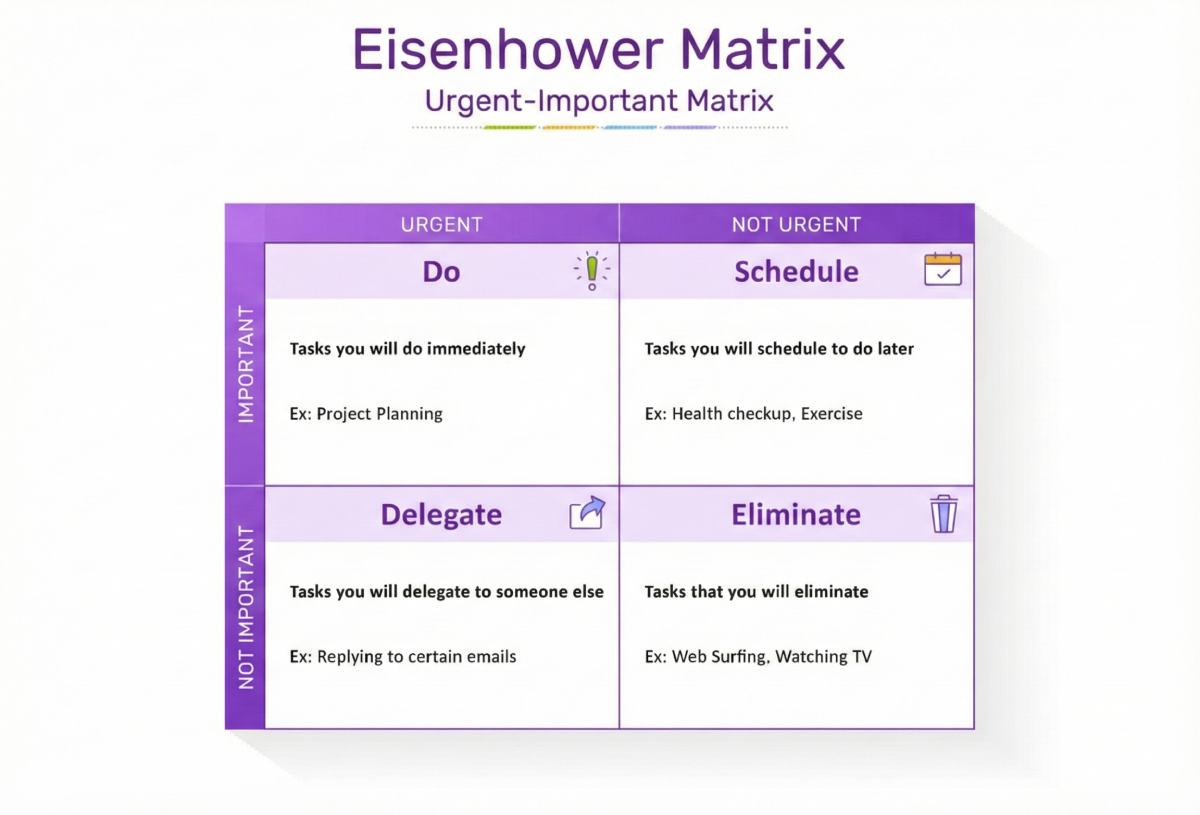
1. Think in Terms of the Eisenhower Matrix
It helps to view the process through the lens of the Eisenhower Matrix: a box split into Urgent/Not Urgent and Important/Not Important. Any ticket that enters your support desk should fit into one of these four boxes. Based on where it falls, you either address it immediately, schedule it, or defer it.
2. Observe the 80/20 Rule
The 80/20 Rule is a universal principle that says 20 percent of the inputs typically produce 80 percent of the outputs. This is true whether you’re creating a workout regimen or trying to manage IT and support issues and tickets for your business.
With a support ticket, the goal of managing tickets should always be to the other 80 percent of tasks that are a waste of your time. This ensures most of your ticket management is hands-off, while you’re manually addressing the ones that matter most to the product team.
While this makes sense on an intrinsic basis, it can help to put some dollars and cents behind it. Research shows that self-serviced tickets cost an average of $2 to handle, while tickets that require IT support cost $104 on average. And if a ticket requires field support, you’re looking at an average of $221. By addressing the simplest tasks of customer queries via automation, you can save $100 or more per ticket!
3. Track and Utilize Data
You know what they say – assumptions make an…well, you get the picture. If your ticket triage process prioritizes tickets, routing tickets, and ticket priority is based on assumptions, prepare for inefficiencies, bottlenecks, and lots of frustration. In order to thrive, you must let the data tell you what to do.
Make sure you’re constantly tracking data and using it to help iterate your workflow and processes. If the data says you’re off, you’re off – it’s as simple as that! Data doesn’t lie. Your opinions and preconceived notions do.
4. Allocate Agents and Define Roles
Getting the ticket to the right person requires you to have the right person trained to direct a support ticket and wait for the ticket to arrive. In other words, it doesn’t matter if you send a ticket to the “network connectivity bucket” if there’s nobody there who is equipped to handle it.
To ensure your triaging works, allocate agents to the right team and define roles. The support team plays a crucial role in managing and resolving support tickets efficiently. Every person on the team should know what tasks they’re responsible for, as well as what other people are responsible for. This eliminates confusion and gives the engineering team and everyone a more complete picture of what’s happening at all times.
5. Streamlining Ticket Triage with AI
If all of this sounds like a lot, that’s because it is. If you attempt to tackle ticket triaging with a manual approach, you will fail. You must automate with machine learning models and streamline to lower the number of inputs required and to reduce the risk of human error. The best way to do this is through the implementation of an AI ticketing system and AI service desk platforms.
Service Level Agreements (SLAs) and Ticket Triage
Service Level Agreements (SLAs) are the foundation of the ticket triage process, setting out what should happen and by when support tickets should be acknowledged and resolved. SLAs define response times and resolution targets for different types of tickets, so support teams can prioritise tickets and focus on the high-priority ones that need attention right away.
By following SLAs, support teams can be accurate in automated ticket resolution, allocate resources where they are needed most, and ensure customer support meets or exceeds expectations. Well-defined SLAs also help reduce ticket backlogs by keeping the support process on track and making sure no ticket is left unattended. Plus, SLAs provide a framework for measuring performance, identifying areas for improvement, and optimising the triage process to deliver great customer service and customer satisfaction.
Clear Communication in Ticket Triage
Clear communication is vital throughout the ticket triage process. Support agents must keep customers informed about the status of their support tickets, provide timely updates, and set realistic expectations for resolution. This transparency not only boosts customer satisfaction but also helps manage customer issues more effectively.
Within support teams, clear communication ensures that tickets are handed off smoothly between agents and other teams, such as those handling technical issues or complex cases. Documenting the ticket resolution process and sharing insights helps everyone learn from past tickets and improves future triage efforts. By prioritizing clear, consistent communication, organizations can reduce misunderstandings, speed up response times, and deliver high-quality customer support—even when dealing with complex issues.
Ticket Triage Process Automation with AI
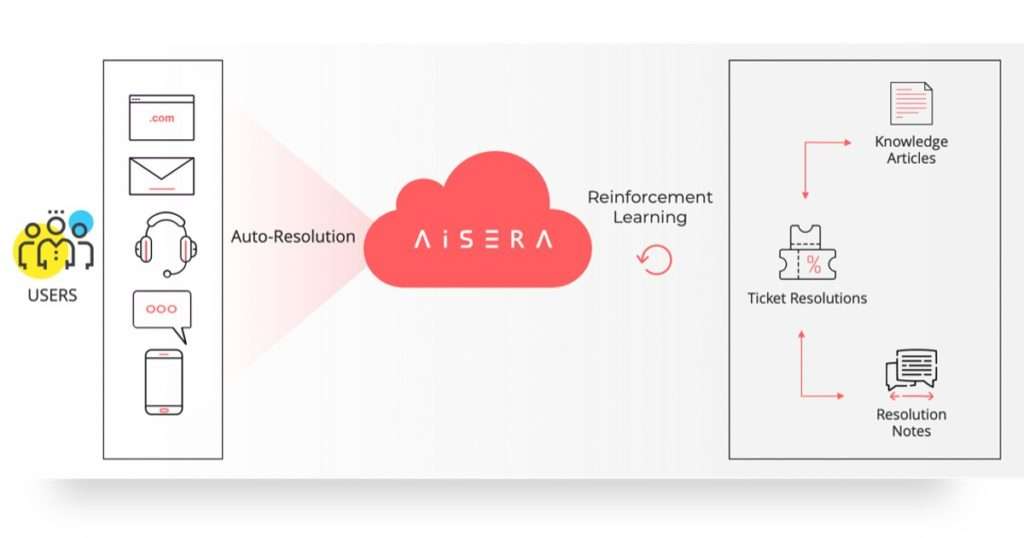
Aisera’s Agent Assist emerges as an advanced solution tailored for organizations at various stages of growth, grappling with high volumes of service tickets. This system utilizes sophisticated AI-driven automation to efficiently classify and route tickets, thereby improving resolution times markedly. Incorporating AI employee experience through seamless ticket automation directly contributes to enhanced productivity organization-wide.
Aisera Assist not only classifies and routes tickets efficiently but also enhances ticket deflection. By automating responses to common inquiries, the system reduces the volume of tickets that require direct human intervention, thereby streamlining support operations and improving resolution times.
Some of the specific features and benefits of Aisera’s ticket triage process include:
- Auto-resolve support requests across channels
- Automatically assign and route tickets and cases to the right agents
- Recommend next-best-actions for ticket and case resolution
- Automate knowledge resolution and ticket/case resolution notes
- Agent coaching with AI-driven recommendations
With Aisera Ticket AI, every repetitive and time-consuming process can be automated for maximum efficiency, and with AI assistance, the proper IT, HR, and customer service teams are only sent tickets that align with their skills and abilities.
Best of all, anything that can be addressed using existing knowledge articles, templates, or past tickets or case resolutions is automatically resolved without any human involvement. If you’re interested in seeing how Aisera can elevate your service, employee, and customer experiences while reducing service costs, request a custom AI demo today!
Measuring Success in Ticket Triage
To improve, you must measure. The most critical KPIs for a triage system include:
- Response Time: How fast is the ticket acknowledged?
- Resolution Rate: How many tickets are solved on the first contact?
- Backlog Size: Is the queue growing or shrinking?
- CSAT Score: Are customers happy with the speed?
To improve ticket triage, support teams need to measure their success with key performance indicators (KPIs). Key metrics are response time, ticket resolution rate, customer satisfaction scores and the size of the ticket backlog. By tracking these KPIs, support operations can see trends, spot bottlenecks, and make data driven decisions to refine the triage process.
By regularly reviewing these metrics support teams can optimize resource allocation, prove their value to the business, and ensure customer support is always getting better. Continuous learning and process improvement is key to high customer satisfaction and a smooth-running support function.
Future of Ticket Triage: Conclusion
The ticket triage process is being transformed by Agentic AI, ITSM ticketing systems, and emerging automation technologies. Agentic AI systems are autonomous support agents that can route and prioritize tickets, execute tasks, learn from interactions and collaborate with human agents when needed. These agents use advanced natural language understanding and real-time reasoning to drive context aware triage.
Modern ITSM platforms now have AI assistant and machine learning (ML) models that predict ticket volumes, detect anomalies, dynamically classify and assign tickets based on urgency, historical data and sentiment analysis. By automating low level tasks and orchestrating multistep workflows across systems, these technologies reduce resolution time and improve the end-user experience.
As organizations adopt leveraging Agentic AI in ITSM, ticket triage is moving from a reactive support function to a proactive intelligent service layer – improving operational efficiency, increasing employee productivity, and delivering customer satisfaction at scale.
Best of all, anything that can be addressed using existing knowledge articles, templates, or past tickets or case resolutions is automatically resolved without any human involvement. If you’re interested in seeing how Aisera can elevate your service, employee, and customer experiences while reducing service costs, request a custom AI demo today!